We have compiled a list of manufacturers, distributors, product information, reference prices, and rankings for Voice input support software.
ipros is IPROS GMS IPROS One of the largest technical database sites in Japan that collects information on.

Voice input support software - List of Manufacturers, Suppliers, Companies and Products | IPROS GMS

Voice input support software Product List

1~4 item / All 4 items

Displayed results

[For Schools] WorkingVoice Paperless Solution

Streamline grade management! Achieve paperless with voice input.

In educational institutions, accurate and efficient grade management is essential. Particularly when recording a large number of students' grades manually, input errors and time wastage become significant challenges. Handwritten records also complicate aggregation and analysis, increasing the burden on teachers. The WorkingVoice paperless solution provides a voice system as an EXCEL add-in, addressing these issues by digitizing handwritten records. By directly inputting voice data into your existing EXCEL format, it enables immediate paperlessness and contributes to the efficiency of grade management tasks. 【Usage Scenarios】 - Recording exam results and classroom comments - Tracking students' learning progress - Information sharing among teachers 【Benefits of Implementation】 - Reduced input time - Decreased errors - Improved data aggregation efficiency - Cost savings through paperlessness

  • Voice Recognition Software
  • Voice input support software

Added to bookmarks

Bookmarks list

Bookmark has been removed

Bookmarks list

You can't add any more bookmarks

By registering as a member, you can increase the number of bookmarks you can save and organize them with labels.

Free membership registration

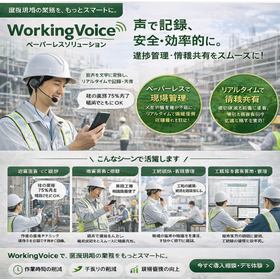
Construction-oriented WorkingVoice paperless solution

The first step towards DX! Streamlining paper records at construction sites with voice input.

In the construction industry, site management often involves keeping daily records on paper, which makes transcription and aggregation time-consuming. In particular, records taken on-site are easily affected by weather and working conditions, and there is a risk of loss or deterioration of these records. To address these challenges, digitizing records is essential. The WorkingVoice paperless solution provides a voice system as an Excel add-in, allowing direct voice input into your existing Excel format, achieving paperlessness on the same day. By opening an Excel format file and clicking the voice input button, you won't need to touch the mouse until the data entry task is complete. Input errors and cell movements can also be executed using "voice commands" without clicking. 【Usage Scenarios】 - Creating daily reports for construction sites - Preparing progress reports - Maintaining safety management records 【Benefits of Implementation】 - Reduction in record-keeping time - Decrease in recording errors - Faster information sharing

  • Voice Recognition Software
  • Voice input support software

Added to bookmarks

Bookmarks list

Bookmark has been removed

Bookmarks list

You can't add any more bookmarks

By registering as a member, you can increase the number of bookmarks you can save and organize them with labels.

Free membership registration

Creating a Trusted Company through On-Site DX - WorkingVoice

Achieving on-site DX with voice input. Creating a trusted company with accurate data - WorkingVoice.

WorkingVoice, which realizes on-site DX through voice input, eliminates handwritten notes and double entries, enabling accurate data recording on the spot. It can be implemented with just a PC and a headset, and familiar Excel can also be utilized. Users can input data hands-free and eyes-free without stopping their work, preventing human errors in real-time. Accurate data supports quality and contributes to building trust in companies.

  • Other production management systems
  • Voice input support software

Added to bookmarks

Bookmarks list

Bookmark has been removed

Bookmarks list

You can't add any more bookmarks

By registering as a member, you can increase the number of bookmarks you can save and organize them with labels.

Free membership registration

Excel is a good listener.

Input numerical values into Excel cells from the microphone's audio! Directly set the read-out numerical data into Excel cells.

Are you having trouble with voice input into Excel? This software directly sets the voice-input numerical data into the currently selected cell in Excel. You can also input short sentences that are not numerical (within about 20 seconds). It will repeat the entered content back to you by voice. You can use voice commands to move to adjacent cells up, down, left, or right. It utilizes the voice recognition feature of the Google Chrome browser, so the conversion accuracy is high. There is no need for a Google user ID or login to Google. You can choose to use either of the two input modes: [Numerical / General Text]. It can also be used to input into Windows' built-in Notepad or the free software Terapad. It is useful for quickly creating drafts.

  • Voice Recognition Software
  • Voice input support software

Added to bookmarks

Bookmarks list

Bookmark has been removed

Bookmarks list

You can't add any more bookmarks

By registering as a member, you can increase the number of bookmarks you can save and organize them with labels.

Free membership registration